
How to make IP Call (Direct call) \ P2P Call in FIBERME FAP27xx
To establish a call from FAP27xx IP-Phone to another 27xx IP-Phone, It is necessary to configure two FAP27xx IP-Phones . This will enable the IP-Phone FAP27xx to call the other IP-Phone FAP27xx without IPPBX .
On this page
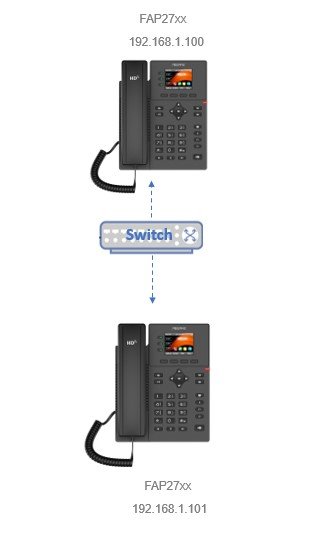
IP-Phone(A)
Model : FAP27xx
IP: 192.168.1.100
IP-Phone(B)
Model : FAP27xx
IP: 192.168.1.101
Topology#
How to configure#
We will perform the same configuration on both IP-Phones (A) and (B)
1- Login into IP-Phone FAP27xx web GUI.
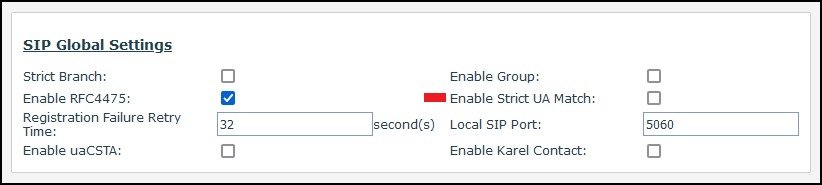
2- On FAP27xx web GUI, navigate to Line -> SIP Global Settings
-Remove the mark in Enable Strict UA Match
3- Navigate to Line -> Phone Settings -> Basic Settings
– Make sure Allow IP Call is enabled

How to make call on phone#
In IP-Phone write 192*168*1*101
Click Dial
Still stuck?
FIBERME support can look at your setup with you. Certified Partners can also ask in the FIBERME Community, and anyone can learn the systems step by step in the free courses of FIBERME Academy.